How QR Ordering Keeps December Celebrations Running Smoothly
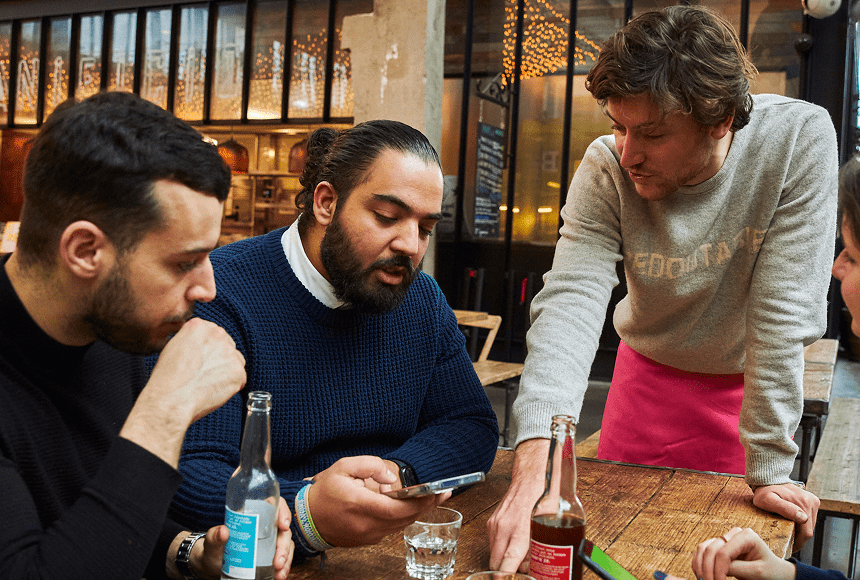
December is often a whirlwind for restaurants, with large groups celebrating the year’s end. QR ordering helps speed up the process, reducing wait times and preventing missed orders. By letting customers self-order through their smartphones, restaurants streamline service and keep the holiday vibe positive. Staff remain focused on meaningful tasks, such as personal interaction and upselling, rather than juggling handwritten orders. QR technology also enables speedy tipping and hassle-free bill splitting, enhancing the guest experience. For restaurants, it translates into higher table turnover and reduced stress, making December not just manageable but profitable.
The December Rush—and Why It Matters
December arrives like a blizzard of reservations. That can mean great revenue, but it also brings the risk of overwhelming back-of-house, front-of-house, and your servers’ mental stamina. We always want to provide top-notch hospitality, yet big parties can test our limits. Large groups are more likely to stay longer, modify orders frequently, and request split checks. You may even have to combine tables, rearrange furniture, and coordinate menus that cater to a variety of dietary needs. All of these extra steps can gum up the works.
This is exactly why technology like QR ordering has exploded in popularity. The National Restaurant Association (restaurant.org) has reported steady growth in tech-based solutions in the past couple of years. Restaurants are adopting QR codes to solve order-taking bottlenecks and ensure that staff remain calm under the holiday rush.
Let’s face it: when it comes to December group dining, time is money. Extended wait times or order mishaps can leave customers sour, and none of us want negative word-of-mouth—especially when year-end reviews, large corporate accounts, and returning families are all on the line. QR ordering is a slick alternative, allowing guests to take the lead and place orders right from their seats. It blends the spirit of quick-service ordering with the ambiance of full-service dining—no frantic server scribbling in a notepad, no confusion about item descriptions, no stepping on toes in a crowded dining room.
Why QR Ordering Transforms Large-Group Service
Technology isn’t a silver bullet, but QR ordering can be a lifesaver for certain high-demand situations. As soon as guests scan the code on the table—using their own smartphones—they get immediate access to a digital menu. They can browse images, check precise descriptions for each dish, and place their orders when they’re ready. Payment is sometimes integrated right into the same interface, removing the dreaded check-drop shuffle. This kind of self-service approach offers a more relaxed environment because your diners feel in control, and you unapologetically free your staff from the manual grunt work that usually eats up their time during large-group seatings.
In busy December scenarios, these benefits are magnified:
- Reduced Waiting: Guests don’t need to wait for a server’s attention. Large groups can place their orders at their own pace, eliminating those awkward “Who had the chicken?” moments.
- Fewer Errors: A digital interface prompts diners to confirm exactly what they want. No more frantic scribbles on a pad. Avoiding misread handwriting helps the kitchen avoid mistakes.
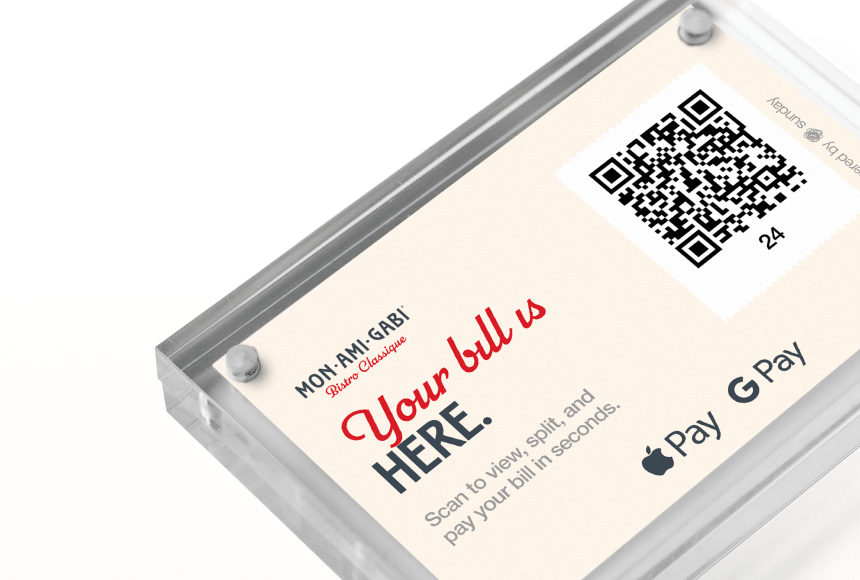
- Easier Splitting: When the check arrives, there’s no confusion over who owes what. Systems like sunday let each guest see their share or pay collectively without stress.
- More Tipping Opportunities: QR-based systems often include built-in tipping prompts. A subtle nudge can lead to higher gratuities and a happier team.
- Streamlined Upselling: The digital menu can highlight special offers or limited-edition holiday items. You can gently encourage customers to add that specialty cocktail or dessert.
No solution fits every situation, but for large groups that want efficiency, QR ordering offers a straightforward way to smooth out the meal process. It’s as if you’re giving your diners a personal remote control for their dining experience, letting them press “play” whenever they’re ready.
Crafting a Seamless QR Menu
Creating a winning QR menu goes beyond slapping your regular menu in digital form. To make it an actual lifesaver for December’s big crowds, focus on clarity, speed, and an engaging design that mirrors your restaurant’s personality. Here’s how:
- Keep It Simple: A giant, cluttered menu slows people down. Large groups appreciate categories and clear item descriptions. If you have a special holiday menu, group those dishes together for quick discovery.
- Use High-Quality Images: Great visuals help diners make quicker decisions. Showcase your star dishes with bright, profesionally taken photos.
- Include Chef’s Recommendations: Whether it’s a holiday dessert or a seasonal appetizer, highlight your show-stoppers. This can drive impulse orders and help uncertain diners pick faster.
- Be Upfront About Dietary Needs: Part of being inclusive is labeling items clearly: gluten-free, vegan, or lactose-free. Large family gatherings may have multiple preferences, so this courtesy will wow them.
- Offer a Social Element: Add some descriptive copy. People want to know your story and the inspiration behind your dishes. A quick personal note builds a real connection, even in a digital environment.
- Test It Thoroughly: Try scanning the QR code from various devices to ensure the menu loads correctly and speedily. Ask friends or staff to place test orders. Clunky interfaces can annoy your guests.
Remember that a QR menu is not a substitute for hospitality. It’s an aid that complements your staff’s effort. You can still encourage a warm greeting, personal recommendations, and a friendly vibe. The QR menu just makes sure the administrative details don’t overshadow the personal moments of service.
Boosting the Festive Mood—and Your Bottom Line
Nearly every December, we scramble to find ways to maximize seatings without turning the dining room into a frantic assembly line. QR ordering helps maintain a comfortable flow. Here’s where it gets even better: the technology can help you drive more sales.
When people order through their phones, they’re more likely to explore the entire menu, rather than stick to a safe “I’ll have what he’s having.” Plus, strategic features in some digital ordering solutions let you showcase holiday cocktails, seasonal sides, or special courses that people might otherwise miss if a server is rushing from table to table.
This can translate directly into higher check averages. Imagine the scenario: a large group has settled in, they’ve toasted with one round of drinks, and suddenly they see a glittery photograph of your limited-time holiday punch. With a single tap on their phone, they have the opportunity to add that punch to their ticket. No need to flag down a busy server. It’s an impulse order, but it’s also a frictionless user journey that leads to a higher tab.
Case Study: Bella’s Downtown Eatery
Meet Bella. She runs a cozy yet upscale Italian restaurant called Bella’s Downtown Eatery. Each December, she hosts office fêtes, big family dinners, and even a few out-of-town tour groups. This year, she decided to try QR ordering for her busiest month. While nervous about customer adoption, Bella saw immediate results:
- Adoption: About 75% of her December groups used the QR system without Bella needing to push it. The other 25% still wanted a more traditional experience, which her staff was happy to provide.
- Revenue Spike: She observed a 15% increase in average party checks. Upselling was built into the menu layout, so big tables often splurged on extra appetizers or mini champagne bottles for toasting.
- Happier Staff: Servers reported reduced stress. Instead of jogging back and forth for order clarifications, they could be on hand for personal touches—offering pairing suggestions, helping with dietary concerns, and taking group photos.
- Faster Turnaround: Average table turnover improved by roughly 20 minutes because folks could order quickly. And with integrated payment solutions like sunday, splitting the bill was a breeze.
Bella’s story is a classic example of how a well-implemented QR solution can simply streamline the entire dining process. The best part? She didn’t overhaul her entire system. She integrated the QR code ordering into her existing flow, ensuring those who wanted traditional service still felt at home.
Encouraging Tips and Positive Feedback
Tipping can be delicate, especially with a large group of diners. If you’re using a digital platform like sunday, there’s built-in tipping functionality that prompts guests in a user-friendly way. Instead of rummaging through their wallets, your customers see a clear nudge to leave gratuity. That prompt will often result in a bigger tip if it’s customized appropriately.
Best of all, many digital ordering systems let diners leave a Google review while they’re still basking in the afterglow of a lovely meal. The less friction, the better. One quick tap, and they can share their positive impressions with the world. This kind of real-time feedback is crucial for building your online reputation—something that can significantly impact future bookings.
It’s worth noting that, according to Restaurant Business Online, restaurants with strong online reviews see a noticeable uptick in group reservations, especially around holiday seasons. People want to celebrate in places rated highly by their peers. With integrated technology, you can capture that valuable feedback on the spot.
Understanding the Operational Impact
One of the biggest benefits of QR ordering is the relief it gives your staff. Large groups can be physically demanding. Your servers are typically in charge of taking complicated orders, repeatedly checking who got which dish, and running back and forth with pitchers of water and stacks of plates. This intensifies during the holiday surge when some guests require special attention, such as seat relocations or birthday cakes.
By shifting a portion of the ordering process to QR codes, your staff can focus on higher-value tasks—like ensuring your guests have a good time. This doesn’t mean staff become dispensable. On the contrary, they become more instrumental in guiding the overall customer experience.
Even the back of house reaps operational benefits. When orders are transmitted digitally, they land directly in the kitchen’s system, supported by your restaurant’s existing ordering software. By avoiding hand-copied tickets and scrawled meal codes, the kitchen can produce dishes faster and more accurately.
This synergy leads to:
- Less Congestion: Large groups have a way of overwhelming staff if orders come in all at once. QR ordering can stagger requests, making them easier for the kitchen to manage in real time.
- Shorter Wait Times: The kitchen stays on schedule when it receives properly organized orders. Faster service means happier guests and quicker turnover.
- Better Communication: Digital platforms often let staff add notes (like severe allergies or “no mushrooms”) more securely, minimizing confusion in the hustle and bustle.
- Reduced Mistakes: Fewer wrong orders or comps come out of a system that’s less prone to human error.
Practical Tips for Implementing QR Ordering
If you’re intrigued by QR ordering but aren’t sure where to start, here’s a quick roadmap:
- Choose Reputable Software: Look for a solution designed specifically for restaurants, one that integrates easily with your existing POS system. You want something proven, not a patchwork of separate platforms.
- Design a Quick-Loading Menu: Too many large images can slow things down. Optimize your images for the web and ensure the menu is intuitive to navigate. Avoid complicated text or multiple layers of sub-menus.
- Training and Role Play: Train your team thoroughly. Let them try scanning the QR code, placing orders, and completing payments. They should be ready to guide customers who may be less tech-savvy.
- Set Clear Table Guidelines: Make sure your staff points out the QR code stand or sticker as soon as the group is seated, explaining briefly how it works. But keep it casual—no one wants a technology lecture during dinner.
- Combine with Personal Service: QR ordering should not replace genuine hospitality. The best approach is to let people know you’re there if they prefer ordering verbally. Having a server do quick check-ins is still important for building rapport and addressing questions.
- Promote It: Use tasteful table tent cards, short instructions on the table, or a simple mention by the host. Make it seamless for guests to fall in love with your QR ordering feature, especially if they come in big groups.
Calculating the ROI of QR Ordering: Is It Worth It?
Let’s talk money—because any investment we make as owners should return value. Large groups typically drive checks higher, but also demand more from your team. If your staff feels squeezed, or if your dining room is packed with slow-moving tables, you risk losing potential turnarounds.
When you add QR ordering, you cut down on the time staff spend repetitively taking orders and re-checking them. You also minimize potential losses from order errors or comps. Meanwhile, you quietly boost check sizes with thoughtful menu layouts that encourage add-ons. The combined effect can offer a tangible return on your investment.
Of course, you’ll have to pay for the QR ordering solution (or incorporate it into your existing platform fees). But consider these gains:
- Time Savings: Frees up servers to handle more tables or spend more time upselling.
- Reduced Errors and Comps: Minimizes freebies given out to soothe mistakes.
- Guest Turnover Boost: With faster ordering and payment, you can seat multiple groups in the same window.
- Larger Orders: Impulse buys and easy add-ons lead to higher check totals.
- Positive Online Reviews: Smoother service experiences drive more 5-star reviews, attracting new customers.
Financially, that’s a strong argument for implementing a system like sunday, which ties together quick QR ordering and payment. It’s a balanced solution that helps you handle big crowds during the holiday season without sacrificing the warm, personal experience that keeps guests coming back.
Maintaining the Personal Touch
We know technology can sometimes feel impersonal. But large groups in December aren’t just looking for speed—they also want genuine connections, especially if they’re celebrating milestone events. The key is to blend digital convenience with authentic hospitality.
A few suggestions:
- Greet Guests Properly: Even if you hand them a QR code right away, start with a warm welcome. Let them see your smile. Offer help with the coats and holiday gifts they might be lugging in.
- Encourage Interaction: Servers should do quick rounds, checking if diners need clarifications or if they have special requests. A quick table visit can give that personal connection that a phone screen alone can’t replicate.
- Seasonal Ambiance: Make sure your restaurant is decked out in cheerful décor. The environment supports the digital ordering experience, not the other way around.
- Human Check-Ins: Technology might handle the ordering, but your staff should still deliver plates with a personal flourish, making eye contact and offering a short story about the dish if it’s special.
The result is a balanced ecosystem where technology handles routine tasks, leaving you free to create memorable holiday moments for your guests.
Bringing It All Together
December is a gauntlet. We prepare for it all year: special menus, extended hours, extra staff. Even so, large group reservations can pile on the pressure. Instead of letting these crowds overwhelm you, harness QR ordering as a rescue line, ensuring your entire operation runs like a well-seasoned sauce.
In a time when restaurants face ever-growing customer expectations—and when online reputations can shift on a dime—the advent of digital solutions like sunday offers a new edge. You gain control over wait times, table turnover, upselling opportunities, and even feedback collection. It’s an exciting step forward that could reshape how your restaurant navigates the biggest month of the year.
FAQ
1. Do customers need any special app to scan QR codes?
Most smartphones have a built-in camera feature capable of scanning QR codes automatically. No extra downloads are typically required. If your guests have older phones, a free QR scanning app can do the job.
2. Is it too complicated for older or less tech-savvy guests?
With minimal explanation from your staff—pointing a phone camera at the code—guests of all ages typically manage just fine. Plus, you can still offer a physical menu or traditional ordering method for those who prefer it.
3. Can I still maintain my restaurant’s brand identity on a digital menu?
Absolutely. Modern QR systems let you customize fonts, colors, and images to reflect your restaurant’s brand personality. You can even add short descriptive texts sharing the backstory or inspiration behind a dish.
4. What about data security and privacy?
Reputable providers encrypt every transaction. Be sure to choose a well-reviewed platform that follows standard protocols for data protection, like PCI compliance for payment information.
5. Does QR ordering replace servers entirely?
Not at all. It’s merely a tool that helps with large groups, speed, and accuracy. You still need human interaction for the warm, personal care that a phone can’t replicate, especially during festive gatherings in December.


 1min
1min
 1min
1min