Keep the Festive Spirit Intact: How QR Ordering Minimizes Holiday Mix-Ups
The Pressure Is On: Why Order Errors Spike During the Holidays
It’s the most wonderful time of the year—for your customers, at least. But for you, the restaurant owner, the holiday season can often feel like walking a culinary tightrope. With tables fully booked, servers juggling countless requests, and the kitchen working at full throttle, mistakes can happen more easily than anyone wants to admit. Whether it’s mixing up steak cooking temperatures, delivering the wrong dessert, or failing to remove that single allergen a customer specifically mentioned, errors can escalate quickly at peak moments.
Data from the National Restaurant Association suggests that overall restaurant sales and customer volume see a notable uptick between November and early January. This surge is fantastic for revenue but can introduce chaos into your daily operations if you’re not prepared. And as you’ve likely witnessed, even small mistakes under these high-stress conditions can lead to big customer dissatisfaction—or worse, negative online reviews that can linger long after the last holiday balloon drop.
These pressures beg the question: how can restaurants reduce the risk of human error, keep staff morale high, and deliver an excellent guest experience even on the busiest days? The answer is simple, approachable, and surprisingly effective: QR ordering. Let’s explore how scanning a simple code can dramatically cut down on confusion, ensuring your holiday season remains bright for you, your team, and your customers.
What Is QR Ordering and Why It Works
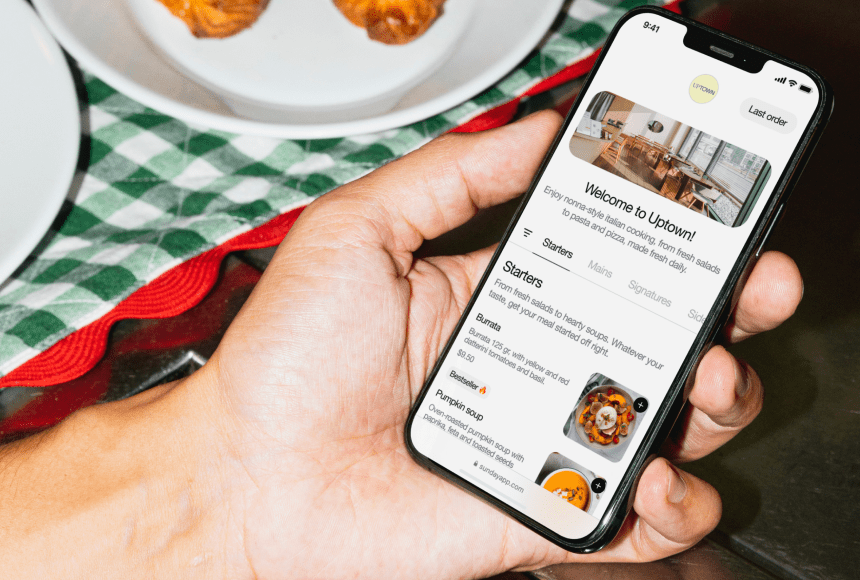
QR ordering is a digital solution that enables customers to scan a Quick Response (QR) code—usually placed on tables, coasters, or menu stands—to view your menu, customize orders, and send instructions directly to the kitchen. All of this happens through a guest’s smartphone or tablet. No more deciphering scribbled handwriting or second-guessing hurried requests. QR ordering ensures accuracy from the start.
Why does this technology make such a difference? For starters, it cuts out the middleman in terms of order entry, which is traditionally the server inputting requests into a point-of-sale (POS) system. With QR ordering, diners themselves handle that step. They see the exact dishes, descriptions, and prices, and they can make their selections with a simple tap. This not only streamlines how orders move through your operation but reduces the number of “translation” points; the fewer times an order is relayed, the lower the chance of a mix-up.
How QR Ordering Addresses Common Holiday Errors
Let’s dig into the meat (or tofu) of the matter. Above all, you want to tackle those pesky errors that spring up when you’re busy. Here’s how QR ordering brings an edge:
- Accuracy in Customization: Guests can fine-tune their meal exactly how they want it—whether that’s extra sauce on the pasta or holding the onions on a burger. Because they click or type in the request themselves, there’s no confusion for the kitchen staff.
- Reduction of Communication Slip-Ups: In a bustling dining room, it’s easy for a server to mishear or misunderstand a special request. QR ordering puts these instructions into a digital note that goes straight into your order system, leaving less room for errors caused by background noise or distractions.
- Speedy Order Flow: Servers often get slammed with multiple tables requesting attention at once. By letting customers initiate their own orders through a QR code, your staff can focus on delivering a memorable experience—think friendly greetings, efficiency, and ensuring that each glass is filled—rather than transcribing orders.
- Automatic Upsells and Reminders: QR ordering platforms can be programmed to remind customers of add-ons or specials. It’s a subtle push to mention a festive cocktail or upgraded side dish. Not only does this benefit the bottom line, but it also ensures guests know their options up front.
The Real-World Impact: Meet “Fireside Eats”
To put this into perspective, let’s follow a hypothetical neighborhood steakhouse called Fireside Eats. They’re cozy, classic, and pride themselves on a personalized touch. However, in December, the dining room is filled to capacity. The phone is ringing off the hook, and the staff is working long shifts to keep up.
Before adopting QR ordering, Fireside Eats faced a 10% rise in order complaints during holiday dinners. Customers cited everything from missing sides to incorrect spice levels. Servers were rushing, and the atmosphere—while still warm—felt tense. Determined to preserve its strong neighborhood reputation, Fireside Eats introduced QR codes at tables for the holiday season. Here’s what changed:
- Human errors dropped noticeably because diners entered their own orders.
- Servers spent more quality time engaging with guests, rather than scribbling orders down.
- Kitchen staff appreciated the more precise instructions, reducing stress during peak hours.
By the time the first holiday parties ended, the owner saw not only fewer complaints but more positive reviews on their Google business page. As a bonus, checks were slightly higher due to the integrated upsell prompts in the QR menu. In short, Fireside Eats saved the holiday spirit—and made operations a lot smoother.
Beyond the Order Pad: Additional Benefits of QR Ordering
While minimizing holiday order errors might be your priority, QR ordering offers a suite of benefits that can help your restaurant year-round. Let’s unwrap a few advantages that go beyond reducing mistakes:
- Accelerated Table Turnover: Allowing customers to order and pay from their smartphones ensures quicker transactions. Diners have fewer reasons to flag down a server, and this translates into more efficient seating rotation.
- Labor Optimization: With partial automation of the ordering process, your existing staff can handle more tables with less stress, diminishing the urge to over-hire seasonal help.
- Enhanced Upselling: QR menus can feature striking visuals of your holiday specials and limited-time desserts, prompting customers to explore and add items they might otherwise have skipped.
- Seamless Customer Payments: Solutions like sunday and other platforms support direct payments so your guests can settle bills themselves—no waiting for the card reader or dealing with lost checks. This is especially handy for teams dealing with a high volume of split checks or large holiday parties.
- Zero-Contact Option: Even as the world adapts to health guidelines, some diners still appreciate a minimal-contact experience. QR ordering offers a degree of reassurance for customers who prefer fewer touchpoints.
When you look at the big picture, QR ordering can become the heart of an efficient system—one that not only improves accuracy but also brings a contemporary, tech-friendly vibe to your restaurant’s ambiance.
Implementing QR Ordering: A Practical Roadmap
Curious about setting up QR ordering—or refining the system you already have? It may seem daunting, but with the right approach, it’s as straightforward as prepping your back-of-house for a busy shift. Below is a practical roadmap to help you transition to (or enhance) QR ordering:
1. Assess Your Current Technology Infrastructure
Before incorporating QR ordering, you’ll want to ensure your POS system can integrate with it. If your setup is outdated, you might need to upgrade or find a compatible solution that can handle digital ordering and real-time updates. Modern, cloud-based POS solutions often offer built-in QR ordering features or simple add-ons. At the very least, confirm your internet connection is strong enough to cover your entire dining space.
2. Choose a User-Friendly Service
Selecting the right QR ordering provider is critical. Some platforms focus purely on generating QR codes, while others deliver a whole ecosystem—everything from advanced menu customization to analytics on customer behavior. Look for:
- Intuitive design: If the platform isn’t easy to use, customers might become frustrated.
- Clear pricing structure: Understand exactly what you’re paying for—whether that’s a flat fee, monthly subscription, or a percentage of sales.
- Data security: Confirm the platform follows best practices to protect payment information and personal data.
- Extras like integrated tipping and Google review prompts: Some solutions support features that encourage tipping and direct customers to your review page.
3. Train Your Staff
A new system always comes with a learning curve. Even though QR ordering transfers much of the order entry to your guests, your servers should know how to assist if any diner is confused or technologically challenged. Key training points might include:
- Walking a guest through scanning the QR code and navigating the digital menu
- Explaining how to customize orders (“Just tap the ‘Customize’ button!”)
- Addressing basic troubleshooting—for example, what to do if someone’s phone can’t scan the code or if the internet connection drops
Training also involves understanding the workflow. For instance, how does the back-of-house get alerted to new orders? What if an item runs out? Clarifying these logistics—preferably with a few mock runs—will help staff feel more confident and keep service smooth.
4. Communicate the Change to Diners
Even if QR ordering is increasingly common, not all diners will be familiar or comfortable with it. Some might want to ask a server for menu details, while others could be thrilled to skip waiting for assistance. Consider these communication tactics:
- Tabletop instructions or small stands explaining the ordering process
- Friendly mentions about the system when seating guests
- A quick note on your website or reservation confirmation emails, reassuring customers that help will be available if needed
Many people appreciate technology that helps them get their meal faster and more accurately. But remember to keep a friendly, supportive vibe—nobody wants to feel forced into using a gadget.
5. Make It Festive
Since you’re using QR ordering during the holidays, consider giving your digital menu a seasonal touch. Whether you design a holiday-themed layout or add cheerful images, these small details can help set a festive tone. Think of it as digital décor for your menu—aligning with the décor you already have on-site. A well-presented menu can encourage diners to explore more items, boosting check averages in the process.
6. Monitor and Adjust
Once you’ve launched your QR ordering system, keep an eye on key metrics. Did your average order time decrease? Was there a drop in incorrect orders? Are you noticing fewer complaints or more tipping? Many QR ordering platforms offer backend analytics; use them to refine your approach. Consider making minor adjustments to your menu layout or rethinking the placement of the QR codes if you’re not seeing the improvements you anticipated.
Holiday Staff Morale: An Overlooked Advantage
When we talk about order errors, there’s a major factor at play—staff morale. During the holidays, your servers deal with many moving parts: special menu items, party bookings, gift card sales, and an onslaught of phone calls requesting reservations. Naturally, the stress stacks up.
By letting customers order through QR codes, you’re lightening the load on each team member. That means less anxiety about forgetting to punch in an order or misreading a note scribbled on a pad. This mental relief can help keep your staff more cheerful, which in turn leads to better customer service. And a restaurant with a positive vibe often sees more repeat customers, glowing word of mouth, and yes, better tips.
Paying and Tipping Made Easier
Let’s not forget the dreaded scenario: guests finish their meals, but your servers are nowhere to be found because they’re dealing with a rush somewhere else. Or maybe a table needs to split four ways, but only half the group has cash, and the rest prefer contactless credit card transactions. QR ordering can often integrate with a self-payment option, giving people the freedom to settle their bill at their convenience.
This feature can be particularly beneficial when you have a restaurant full of holiday groups. Some dine-and-dash incidents happen because a group’s final departure from the table can be chaotic. With self-payment, each individual can quietly pay for their share, tip in a transparent way, and head out. Faster turnarounds, more satisfied customers—everyone wins.
A solution like sunday streamlines this process even further, enabling seamless digital payments that are automatically connected to the table’s account. If you want to encourage tips for your hardworking servers, you can preset tip percentage suggestions. When done politely, it can even boost gratuities—in a spirit of good cheer, customers are often willing to reward effective service more generously.
How to Showcase Specials and Limited-Time Offers
Mid-December is often your time to shine with limited-edition dishes or festive drinks. QR ordering offers a prime opportunity to showcase these seasonal treats. Here’s how:
- Prominent Placement: Include a banner or pop-up on your digital menu highlighting “Chef’s Holiday Special” or “Winter Cocktail Favorites.”
- Eye-Catching Photos: A well-lit photo of your holiday peppermint dessert or your signature mulled wine encourages diners to add them to their order.
- Flavor Descriptions: Provide a short but vivid explanation—mention textures, aromas, or fun backstories—and watch your sales go up.
Given that guests see this as soon as they scan the QR code, you’re essentially greeting them with your most profitable holiday fare. And yes, you can also adjust these highlights on the fly if something sells out or if you decide to introduce a new special in the middle of the season.
Building Momentum Beyond the Holidays
Think about this time as a test drive for what could become a permanent addition to your restaurant’s operations. If guests are accustomed to scanning a menu on their phone in December, they’ll be more than happy to do so when they revisit in February or even next summer. Once the holiday rush subsides, you’ll have a system in place that remains beneficial for everyday use.
In line with your aim to reduce confusion and enhance efficiency, QR ordering can continue generating positive outcomes. Plus, it sets you apart from restaurants that haven’t embraced modern solutions. Potential staff hires might see your restaurant as more forward-thinking and guest-centric, which could help in recruiting top talent—always a win in the industry.
Share the Joy—With Fewer Mistakes
Handling a restaurant during the holiday frenzy is both an art and a science. The roar of eager diners, the clinking of festive cocktails, and the anticipation of a perfect meal is part of the magic that keeps this industry special—even if it can lead to operational slip-ups. By integrating QR ordering, you’re not just trimming down your error rate; you’re creating a seamless experience that respects both your diners’ time and your staff’s sanity.
Much like a perfectly balanced seasonal menu, QR ordering technology offers a thoughtful mix of convenience, accuracy, and modern flair. Whether you run a cozy bistro or an upscale steakhouse, the aim is simple: give your holiday guests the most enjoyable experience possible, all while reducing stress on your team. That’s a gift everyone can appreciate.
FAQ: Common Questions About QR Ordering and Holiday Operations
1. Do older guests find it difficult to use QR ordering?
Some older or less tech-savvy guests may be hesitant at first. Clear instructions and staff support make a big difference. Many are pleasantly surprised by how easy scanning a code can be once they try it. Offer a quick walkthrough if they show any confusion, and consider providing a limited number of printed menus as a backup.
2. Will I lose the personal interaction that makes my restaurant unique?
Not at all. By automating the mundane order entry process, servers have more time to connect personally with guests—suggesting wine pairings, sharing the story behind a dish, or simply ensuring guests feel welcomed. QR ordering helps free up staff from repetitive tasks, which can actually enhance overall hospitality.
3. How secure is the payment process with QR ordering?
Most reputable QR ordering services use robust, industry-standard encryption and adhere to local and international regulations for data security. Always research a platform’s security credentials, and don’t hesitate to ask for customer references or compliance certificates to ensure your guests’ information stays protected.
4. Can I easily update my holiday specials or sold-out items?
Yes. One of the biggest perks of QR ordering is that your menu is dynamic. If you run out of a dish or decide to introduce a new dessert, you can update this instantly. Diners scanning the QR code will see your revised menu in real time, reducing the need to print new menus or spend time verbally explaining changes.
5. Do I need a fancy internet setup for QR ordering?
Not necessarily, but a reliable internet connection is important to avoid disruptions. If your restaurant currently has weak Wi-Fi, invest in a few signal boosters or upgrade to a more robust connection. Guests who can’t connect will get frustrated quickly, potentially negating the benefits of the QR system.
6. Will QR ordering work for large groups or parties?
Absolutely. Large parties can order items at different times and avoid passing a single, paper menu around. Each individual (or subgroup) can scan the code from their smartphones, making the process more efficient. Payment collection also becomes smoother, as guests can pay individually without confusion.
7. What if I want to gather feedback on the spot?
Some QR ordering platforms let you add prompts for feedback or their link to a quick online survey once the payment is complete. This mini questionnaire can be a goldmine for immediate, post-meal insights during the holidays. You could also redirect them to your Google listing to leave a positive review—an ideal boost to your restaurant’s online reputation.
8. Is QR ordering a temporary holiday fix or a long-term strategy?
While QR ordering is incredibly helpful during the holiday rush, it can also become a year-round tool. Many restaurants that initially implement it for seasonal spikes find it so beneficial that they keep it permanently, providing a smooth ordering experience for guests on a daily basis.


 1min
1min