Dodging Pitfalls: How to Perfect Your QR Code Ordering System
Why QR Code Ordering Matters More Than Ever
QR code ordering has quickly evolved from a novelty to a near-essential aspect of restaurant operations. By allowing customers to scan a code and access your menu via their smartphones, it cuts down wait times, streamlines service, and can even boost your average ticket size through easy upselling. In fact, according to a recent study by the National Restaurant Association, 70% of diners now expect a contactless or tech-assisted option when they eat out.
However, implementing QR code ordering isn’t always a smooth ride. Between technological hiccups, staff miscommunication, and design slip-ups, there are several traps that can rob you of the benefits this technology promises. The good news is that these mistakes are largely avoidable with foresight and planning. Let’s walk through the most common pitfalls and how to steer clear of them to make your restaurant’s QR code ordering system a resounding success.
1. Ignoring Older or Less Tech-Savvy Guests
Yes, smartphones are everywhere. But not everyone is equally comfortable using them to order a meal. If your only ordering option is a QR code menu, you risk alienating older patrons, less tech-savvy diners, or anyone without a functioning smartphone. While digital transformation is crucial, forcing everyone to go digital can lead to frustration and lost business.
- Offer an Alternative: Keep a limited supply of paper menus on hand or have a backup digital kiosk in place for those who prefer a more traditional approach.
- Provide Clear Instructions: Not everyone knows how to scan a QR code. Simple, friendly signage or a quick explanation from the host or server can go a long way.
- Monitor Engagement: Track how many guests request paper menus or need help. If the numbers stay high, invest more time in educating staff on how to guide customers through the process.
2. Poor Placement and Visibility of QR Codes
You can have the slickest digital menu around, but if customers can’t find or scan your codes, it’s all for nothing. Tiny or obscured QR code stickers cause confusion and frustration, often leading to delayed orders and grumpy diners.
- Size Matters: Ensure each code is big enough to be scanned without awkward phone angles. A code that’s at least one inch by one inch (2.5 cm) generally works well.
- Strategic Positioning: Place the code where patrons naturally look: at the center of the table, on menu inserts, or even table tents. Avoid random corners or spots under direct glare.
- Test It Yourself: Always whip out your phone to test the scan. If you have to tilt or move around too much to make it work, your customers will too.
3. Unreliable Wi-Fi or Mobile Data
Many customers will rely on your restaurant’s Wi-Fi—or at least a solid phone signal—to access your QR code menu. If your internet connection is spotty or local cell service is weak, guests may fail to load the digital menu entirely. They’ll likely end up frustrated, and that annoyance can tarnish their overall experience.
- Invest in Reliable Internet: Upgrading to a robust router or mesh network can drastically improve coverage. It’s a worthwhile expense if you’re serious about seamless QR code ordering.
- Consider Wi-Fi Password Accessibility: If your Wi-Fi is password-protected, make sure the login details are clearly displayed. The last thing a hungry diner wants is to hunt for a passcode.
- Offline Fallback: Have a few paper menus on standby or preload a simplified digital menu that doesn’t need high-speed data. That way, you’re prepared for temporary outages.
4. Overloading the Menu with Text or Clutter
Just because your menu is digital doesn’t mean you should cram every detail into it. A chaotic, text-heavy menu viewed on a small smartphone screen can be overwhelming. You might assume more detail is better, but in practice, an overcomplicated interface often deters people from exploring your offerings.
- Keep It Simple: Go for clear, concise descriptions. If a dish really needs more elaboration, include an optional “Learn More” button rather than dumping paragraphs on the main screen.
- Use Categories: Organize items into logical sections (starters, mains, desserts, drinks) so customers can navigate easily.
- Visual Balance: Good spacing, intuitive icons, and minimal text make the browsing experience feel more like flipping through a user-friendly app and less like studying a cluttered spreadsheet.
5. Neglecting High-Quality Images
In the era of Instagram, diners expect attractive visuals. A digital menu without images—or worse, with poorly lit or unappealing shots—will dull the excitement of your offerings. One of the key advantages of a QR code menu is the ability to showcase your dishes in living color.
- Invest in Good Photography: Clear, mouthwatering pictures can boost sales by giving customers a realistic idea of what they’re ordering.
- Avoid Stock Images: Generic photos can come across as inauthentic or misleading. Real images of your actual dishes create trust and hype.
- Keep It Updated: If a dish changes or a new special arrives, remove outdated photos to avoid customer disappointment when the meal doesn’t match the image.
6. Forgetting to Train Your Staff
Launching a QR code system is exciting, but how do your servers and hosts feel about it? If the team on the floor doesn’t understand how the system works—or worse, sees it as a threat to their role—tensions can rise. Staff members often become the face of your technology, so they need to be confident and positive about it.
- Hands-On Demos: Before going live, have a test run. Let your employees experience the ordering process on their phones. This helps them provide genuine guidance to customers.
- Clarify Their Value: Emphasize that QR code ordering doesn’t replace their role. It frees them from repetitive tasks and lets them focus on delivering top-notch service.
- Encourage Feedback: Ask your staff what works and what doesn’t. They’re on the frontlines, so their input can lead to improvements you might never think of otherwise.
7. Weak or Non-Existent Upselling
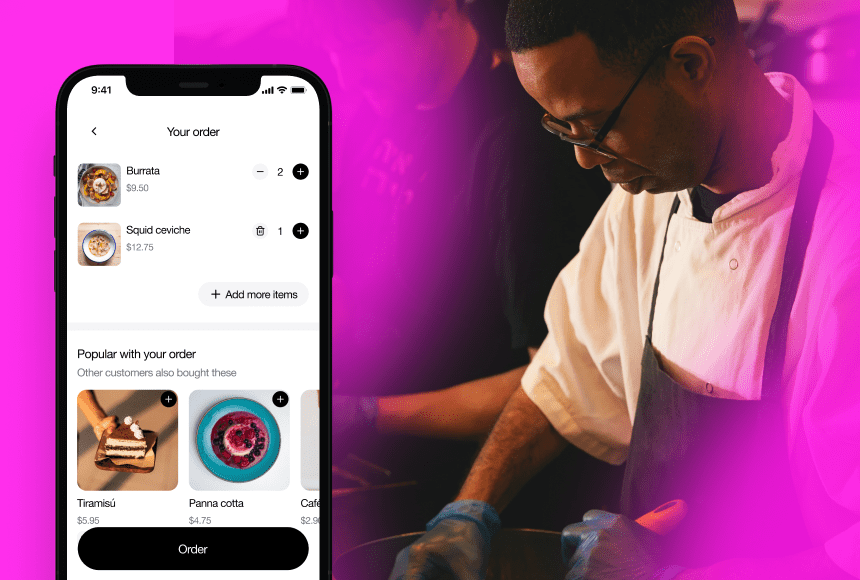
One upside to QR code menus is the ability to subtly (and effectively) upsell. Yet some restaurants launch a basic digital menu without tapping into targeted suggestions or pairing ideas. Missing out on these features is like leaving money on the table.
- Suggest Complementary Items: If someone adds a steak to their cart, a small pop-up could recommend a wine pairing or suggest a specialty sauce.
- Highlight Specials: Pin daily specials or limited-time offers at the top of the menu. Digital allows you to re-order items in real time to spotlight what you need to sell.
- Use Icons or Badges: Label popular or chef-recommended dishes to grab attention and gently guide diner decisions.
8. Overcomplicating the Payment Process
The beauty of a QR code system is that diners should be able to order, eat, and pay seamlessly. If your payment flow is convoluted—requiring multiple apps, endless forms, or a separate link that’s hard to find—you’ll frustrate customers at the final, crucial step.
- One-Click or One-Scan Checkout: Use solutions like sunday that combine easy payment with QR code menus. Fewer steps mean fewer abandoned checks.
- Transparent Pricing: Show taxes, fees, and tips clearly before diners hit “Pay.” Surprises at checkout sow distrust.
- Split-Bill Options: Large groups and quick catch-ups both love an easy way to split the check. Make it intuitive, or you risk staff losing time manually dividing each tab.
9. Failing to Collect Useful Data
One of the biggest advantages of QR code ordering lies in data collection. Every scan, click, and completed order is a clue about customer preferences and habits. Yet some restaurants treat digital ordering as a simple replacement for paper menus, neglecting to analyze the insights under the hood.
- Track Popular Items: See which dishes get added to carts most frequently, then decide whether to keep them permanently or market them more aggressively.
- Identify Bottlenecks: If you notice many abandoned checkouts on one particular page, something might be confusing or off-putting. Fix it fast.
- Refine Your Offerings: Seasonal items that sell well can become permanent. Items that consistently flop might be worth revamping or removing.
10. Neglecting Regular Updates
A digital menu is never truly “finished.” Restaurants change specials, experience supply issues, or experiment with new recipes. If you don’t update your QR code menu in real time, you risk showing items you don’t have or missing a golden chance to spotlight something new.
- Live or Scheduled Edits: Use a dashboard that lets you tweak prices, hide items, or add new sections instantly. Scheduling changes (like a lunch vs. dinner menu) ensures the right items display at the right time.
- Daily Specials Section: Keep it consistently updated. Guests will learn to look here first, building excitement for fresh offerings.
- Avoid “Out of Stock” Disappointment: If an item runs out, remove or gray it out to manage expectations.
11. Underestimating the Need for Branding
A digital ordering system is an extension of your restaurant’s identity. If your design is bland or mismatched with your décor, you lose an opportunity to immerse diners in your brand. Simple text on a stark white background might be functional but doesn’t convey your unique flair.
- Use Your Color Palette: Match your digital menu to your logo and interior vibe. This consistency builds brand recognition.
- Incorporate Storytelling: Don’t hesitate to share tidbits about your ingredients, chef inspiration, or local partnerships. You’re not just serving a meal; you’re sharing an experience.
- Highlight Key Personality Traits: If your brand is playful, incorporate fun icons or witty descriptions. If it’s upscale, use clean fonts and elegant images.
12. Overlooking Accessibility Features
Digital solutions should make ordering easier, not exclude anyone. If your QR code ordering system isn’t accessible to people with disabilities—like vision impairments—it’s not fully serving your community. By law (and basic consideration), you should aim for a platform that accommodates a wide range of user needs.
- Screen Reader Compatibility: Ensure your menu platform supports text-to-speech software.
- Adjustable Font Sizes: Some guests struggle to read small text. A quick “AA” button to enlarge font can go a long way.
- Color Contrast and Clear Icons: Good color contrast helps color-blind users, and distinct icons or shapes can aid navigation.
13. Failing to Promote or Explain Your System
A brand-new QR code system won’t magically succeed if diners don’t realize it’s there—or if they think it’s optional and never try it. Launching the feature is only half the battle; you also need to market it.
- Train Your Hosts: At check-in, hosts should mention, “We use QR code menus—just scan the code on your table to get started!”
- Signage and Table Talkers: Small, attractive signs that say “Order Here” or “Scan to View Menu” can help direct diners’ attention.
- Social Media Teasers: If you promote a new QR code system on Instagram or Facebook, curious guests might arrive eager to try it, rather than confused about it.
14. Ignoring Post-Implementation Feedback
After the rollout, don’t assume everything is perfect. What do guests think about the interface? Are staff encountering the same questions repeatedly? Gathering feedback is crucial for continued refinement.
- Quick Surveys: After a payment, prompt a one-question survey: “How easy was it to use our QR code menu?” A rating scale can reveal if there’s room for improvement.
- Staff Debriefs: Ask your team what they hear from customers. Where do people get stuck? What do they love?
- Iterate Often: Small tweaks—like rearranging menu sections or clarifying instructions—can dramatically improve usability. Don’t be afraid to experiment.
The Path to a Seamless QR Code Ordering Experience
QR code ordering has already proven its value in saving time, reducing labor costs, and enhancing the diner experience. But even the best idea can falter without careful planning and ongoing attention. Avoiding common pitfalls—like confusing interfaces, poor connectivity, or undertrained staff—will help your system run smoothly.
Remember: integrating a tool like sunday can streamline the payment end, closing the loop on that elevated experience you’re crafting. From design choices and staff buy-in to robust data insights, each detail plays a role in ensuring diners walk away delighted rather than discouraged.
If you stay agile—quickly adapting based on real-time feedback, regularly refreshing your menu content, and respecting customer preferences—you’ll soon see QR code ordering evolve into one of your restaurant’s biggest assets. By dodging these common errors and fine-tuning your approach, you can lay the foundation for smoother service, higher check averages, and happier guests who keep coming back.


 1min
1min
 1min
1min