Why Having a Backup Payment Terminal Is Essential on Busy Nights
On bustling nights, a single card payment machine can quickly become a bottleneck. Even a short malfunction can cost you potential revenue and put a damper on your restaurant’s reputation. Having backup payment terminals ensures you can swiftly handle queues, keep your team calm, and maintain a smooth customer experience. Restaurants that invest in contingency solutions often see higher tips, quicker table turnover, and improved customer satisfaction. In a world where most patrons prefer cashless payments, a backup plan is not just a luxury—it’s your safety net. Being prepared for technical glitches or network outages helps you protect sales and preserve your hard-earned reputation.
1. The UK’s Card Payment Landscape
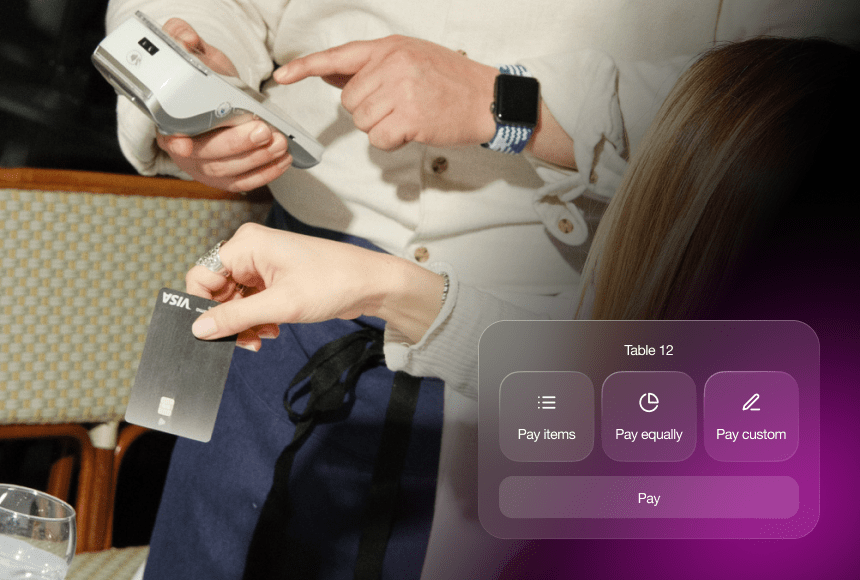
Picture your restaurant on a lively Saturday evening. The tables are packed, the smell of roast lamb with garlic and rosemary drifts through the air, and diners are clinking glasses in celebration. Guests have had a wonderful meal, and now it’s time for the bill. According to the UK Finance Payments Market report, over three-quarters of all payments in the UK are by card or digital methods. The dominance of contactless and card transactions might be a dream come true for operators looking to reduce cash handling—until your only payment terminal decides to have a temper tantrum.
If you’re running just one card machine, any glitch could mean long queues at the counter and exasperated looks from diners. A terminal failure isn’t just an inconvenience; it’s a potential disaster. You might find yourself losing tips or rushing to record card details manually (which raises security concerns). Backup payment terminals shield you from these hiccups, helping you maintain your composure—and your bottom line.
2. When One Payment Terminal Isn’t Enough
In an ideal world, every payment terminal would work flawlessly around the clock. But in reality, technology does what technology does: it can freeze, disconnect, or simply decide to reboot during your peak hours. Here are a few potential nightmares you could face if you rely on a single device:
- Software Crashes: Payment terminals running older firmware can suddenly freeze up, leaving a queue of restless guests.
- Connectivity Failures: Whether Wi-Fi drops or the 4G signal gets patchy, a lost connection can halt all transactions in progress.
- Wear and Tear: Physical issues like worn-out swipe readers or malfunctioning NFC sensors can disrupt payments.
- Power Outages: Even a brief power cut can turn a busy restaurant into a scene of chaos if you have no secondary device.
When the queue starts to form, you might see customers glancing at their watches, servers getting flustered, and your well-organised hosting plans unravel. This is precisely why backup terminals matter. They’re like having an extra oven ready during holiday rushes: you never know when one might blow a fuse, and you need to keep cooking.
3. Quick Service, Happy Diners: The Perks of Backup Terminals
Getting those cheery smiles from your customers when they settle the bill swiftly is what every restaurant aims for. Backup payment terminals don’t just fend off potential catastrophes; they also add layers of speed, efficiency, and relief. Some of the biggest perks include:
- Reduced Waiting Time: Multiple devices let you process payments simultaneously, especially handy when large groups split the bill.
- Improved Staff Efficiency: Servers have the tools they need to take payments anywhere in the dining room, so there’s no awkward queue at a single till.
- Higher Table Turnover: Quick payments mean faster table clearance, which is key for seating the next group of diners without delay.
- Flexibility for Contingencies: If one terminal malfunctions, you have an immediate replacement to avoid chaos at the table.
- Enhanced Guest Experience: No one loves waiting to pay—speed matters. Offering smooth service leaves a positive final impression.
For restaurants that rely on tips, a quick and seamless payment process can also encourage guests to add a little extra for great service. In many cases, frustration at the payment stage can reduce tipping. By eliminating that annoyance, you boost team morale and keep revenue flowing.
4. Practical Ways to Integrate Backup Terminals
Now that you know the value of a backup system, the obvious next question is: how do you seamlessly integrate these extra terminals into your daily routine? Our industry might revolve around good food and atmosphere, but practical and tech-savvy solutions are equally vital to ensure everything runs like clockwork.
4.1 Assigning Terminal Locations
Where you station your terminals matters. You’ll want a main terminal near the bar or host stand, while a backup device could remain mobile for staff to carry around. Or, if you’ve got multiple floors, keep an extra terminal on each level, saving your waiting staff a trip downstairs for every card payment.
4.2 Rotating Use
Technology can fall behind if left unused for long periods. By rotating your backup terminals into regular service, you help ensure their firmware is updated, their batteries remain charged, and the staff stay familiar with the device’s ins and outs. That way, when a glitch strikes, you won’t need half an hour to figure out how to pair that dusty backup machine.
4.3 Training Your Team
Even the best technology won’t help if your front-of-house team is unsure how to operate it. Incorporate quick refreshers during staff meetings or pre-shift briefings. Show how to open a tab, split bills, process contactless and chip & PIN, handle refunds, and switch networks if needed. Growing confident in using multiple devices fosters a sense of calm when the restaurant is bustling.
5. How Backup Terminals Can Save the Day: Anecdotes from the Field
Stories often prove a point more memorably than generic advice. Let’s take a short stroll through some real-world scenarios:
- The Valentine’s Day Crash: A bistro in Manchester expected an evening of candlelit dinners and red roses galore. Halfway through service, the single payment terminal crashed. Patrons were left waiting. A few even left prematurely in frustration—with no chance to pay or tip. The restaurant owner vowed never again.
- The Private Event Lifesaver: An upscale eatery in London’s West End hosted a swanky corporate event. They had two terminals on hand. When the primary device got overloaded—likely due to Wi-Fi interference—the second terminal swooped in to save the day. Not a single transaction was lost, and feedback from the event planner was glowing.
- The Internet Outage: A countryside gastro-pub often hosts group bookings for Sunday roasts. One weekend, their internet provider suffered a wide outage. But staff quickly switched to a backup terminal using a 4G data connection. This saved them from turning customers away and secured a day’s worth of revenue.
These anecdotes aren’t cautionary tales to scare you. They’re gentle reminders that investing in backup devices isn’t about anticipating doom—it’s about being equipped to handle the unexpected. Running a busy restaurant comes with enough stress. A meltdown at the payment stage is the finale no one wants.
6. Payment Tech and the “sunday” Advantage
When it comes to streamlining payments, card machines aren’t the sole contenders in modern restaurants. Many owners now offer digital payment solutions such as QR code payments. This is exactly where sunday slides in as a game-changer. With sunday:
- Guests scan a QR code at the table to pay—no waiting for a terminal to be free.
- Tips become customisable, so your team gets rewarded for great service with minimal friction.
- Automated receipt generation eliminates the need for manual printing and handing over receipts.
- Google reviews can be posted right after payment, leveraging that moment of satisfaction to boost your online reputation.
While it’s not a “backup terminal” in the traditional sense, offering QR code-based payments can act as an alternative channel in case your hardware terminals fail. Keep a couple of card readers for customers who prefer a physical device, but also encourage them to try the more modern, streamlined approach. Variety and convenience give your diners extra reasons to return.
7. Counting the Cost: ROI and Peace of Mind
Let’s talk about the money side of things. Some restaurant owners might say, “Why spend extra on a second or third payment machine if nothing has gone wrong yet?” It’s a fair question—restaurants often operate on thin profit margins in a competitive market. However, the cost of downtime often outweighs the price of an additional device.
Consider these potential losses:
- Uncaptured Revenue: If your single machine stops working mid-service, you might have customers waiting too long or even walking out. Some might promise to return to pay later (best case scenario), but that’s far from guaranteed.
- Damaged Reputation: Online reviews travel fast. Guests who experienced a prolonged checkout process might take to social media or review sites, potentially dissuading future diners.
- Reduced Staff Morale: Your team may become flustered if they can’t quickly close out bills. High stress in the workplace leads to mistakes, tension, and potentially higher turnover rates.
- Maintenance and Repair: Overworking a single terminal increases wear and tear. Repairs or replacements at the last minute can be expensive and time-consuming.
On the other hand, the peace of mind you gain from having a backup terminal is invaluable. It’s like having a spare set of house keys—you might never need them, but the day you do, you’ll be incredibly grateful.
Let’s do a quick comparison in a simple table showing rough estimates of how downtime can affect your revenue compared to having backup terminals at the ready:
| Scenario |
Impact on Revenue |
Outcome |
| Downtime of 1 hour on a busy night (no backup) |
Lose ~£500 in sales + negative reviews |
Stressful, possible staff and customer frustration |
| Downtime of 1 hour (with backup terminals on hand) |
Minimal or no loss in sales |
Smooth recovery, limited impact on customer satisfaction |
| Long-term cost of an extra device |
~£20-£40 monthly rental (varies) |
Peace of mind, more tips, better guest experiences |
Sources vary, but if you consider a busy city restaurant can process thousands of pounds in an evening, even 30 minutes of downtime can wreak havoc on your daily takings. When viewed in that light, the monthly or one-off investment in a backup device is relatively small.
For further reading on the importance of smooth transactions and their impact on business reputation, consider checking out Which? guidance on card payment issues. Though it primarily focuses on consumer advice, it illuminates the challenges restaurants face when payments fail.
8. Operational Tips: Going Beyond the Extra Terminal
Having an extra payment terminal is just one piece of the puzzle. Weathering a busy night unscathed requires a holistic approach to operations. Let’s look at some additional strategies:
- Network Redundancy: Invest in multiple connectivity options—Wi-Fi, Ethernet, and 4G—to ensure at least one network remains active if the main connection fails.
- Regular Hardware Checks: Make a simple maintenance schedule. Update firmware monthly, inspect battery health, and test receipt printers if you use them.
- Menu Management: Keep your digital or physical menu updated in real time to avoid confusion at the billing stage. Surprises on the bill can slow payment processes.
- Staff Cross-Training: Your servers might be masters at recommending the perfect wine pairing, but can they quickly swap a faulty machine for a backup? Ensuring staff are well-rounded in their skills reduces bottlenecks.
- Clear Payment Policies: Make sure your policy regarding accepted payment methods is transparent. Knowing you’re fully prepared to take cash, card, or a QR code payment is reassuring for guests.
These measures integrate neatly with the principle of backups. If you create an environment of redundancy—where no single point of failure can bring you down—you’re in a stronger position to deliver memorable dining experiences every night.
9. Building a Proactive Mindset
Restaurants thrive when they anticipate needs—both in the kitchen and on the floor. If you’d spend time prepping marinade for tomorrow’s meat or carefully scheduling staff for lunch service, it’s only logical to prepare for payment contingencies as well:
- Run Simulations: Once a month, simulate a “terminal failure drill.” See how your staff responds. Do they switch to the spare instantly, or is it a frantic scramble?
- Check Connectivity: Make sure your backup machine can operate on a different network or a SIM data plan for emergencies.
- Seek Feedback: Ask your servers and your customers for suggestions on how to refine the checkout process.
A small tweak, like placing the backup device at the opposite end of the bar, might make a big difference in times of crisis. Being proactive also encourages your team to think on their feet and better serve the guests.
10. The Wider Shift to Modern Payment Solutions
As the restaurant industry evolves, technology is becoming an integral part of the dining experience. Contactless payments, mobile ordering, QR code bills, and digital loyalty programs are no longer novelties—they’re quickly becoming the norm. If your restaurant still relies on a single, old-school card machine, you risk being seen as outdated or, worse, negligent when it comes to your diners’ convenience.
While some guests may prefer the nostalgic comfort of handing a physical card to the server, many younger diners want to pay quickly and be on their way. Offering multiple options—from backup payment terminals to a fast QR code–driven checkout via a platform like sunday—positions your brand as modern, adaptive, and considerate of varied customer preferences.
This trend also extends to taking care of your online reputation. Payment experiences are often the final point of contact before your customer leaves. If that short moment is unpleasant or complicated, no matter how good the meal was, you risk losing a glowing review or future booking.
11. Crafting Your Own Payment Sanctuary
The difference between a smooth closeout and a meltdown is often in the details. Creating a “payment sanctuary” means building an environment where your diners experience consistent, hassle-free checkout every time.
- Dual or Triple Terminal Setup: Spread devices across locations. If one is in use, another is handy for the next customer.
- QR Payment Integration: Lower your reliance on physical hardware by giving guests the option to self-checkout with their phones. This also speeds up table turnover.
- Staff Confidence: Invest time in training, and encourage a culture where staff are never afraid to ask for a refresher if they’ve forgetten how to process a less common payment scenario.
- Consistent Maintenance: Keep your devices updated and tested. A well-maintained machine is less likely to fail under pressure.
Combine these best practices, and you’ll notice immediate improvements in how guests perceive your restaurant and in how your staff copes with pressure.
12. Final Thoughts: Navigating Fully Booked Evenings with Ease
Fully booked evenings should be exciting opportunities to showcase your best dishes, your hospitality, and the personality of your brand. They shouldn’t fill you with dread at the thought of what could go wrong with a single card reader.
Backup payment terminals act like culinary insurance: you rarely think about it until the day you desperately need it. In the hectic environment of a bustling restaurant, knowing you’re well-prepared fosters a calm demeanour in your staff and a sense of reliability in your diners. Every swipe, tap, or scan that goes through seamlessly is another subtle win for your brand—an invisible period at the end of a deliciously crafted sentence.
If you can serve that last flourish with confidence, you’ll see the results in happier customers, glowing online reviews, and a staff that ends the night with an accomplished smile. Backup terminals may not be the sexiest upgrade—no swirl of garnish here—but they are undeniably a must-have for any venue striving for smooth, stress-free service.
FAQ
Below are some frequently asked questions about backup payment terminals and how they can help restaurants thrive during peak periods.
- Isn’t one payment terminal enough for a small restaurant?Even smaller venues face sudden rushes or unexpected technology failures. A single malfunctioning device at peak time can derail your entire service. A backup terminal doesn’t just hedge against technical issues—it ensures consistent service quality, which can help build your reputation for reliability.
- How often should we test or update our backup terminals?Monthly checks are a good starting point. You’ll want to ensure firmware is current and batteries are charged. Rotating the terminals’ usage also helps staff remain familiar with them, so they won’t fumble if the primary device fails.
- Will providing more payment options confuse diners?On the contrary, giving multiple choices—like QR code payments, contactless, or chip & PIN—caters to different preferences. As long as your staff confidently explains each method, guests appreciate the convenience. Clarity in your menu, signage, and server guidance eliminates confusion.
- Are backup terminals costly?Costs vary depending on rental or purchase agreements. However, the expense is often offset by the revenue you protect during potential downtime. Plus, consider the additional benefits of improved table turnover and guest satisfaction when payments run smoothly.
- Can digital payment apps like sunday replace backup terminals entirely?They can work hand in hand. sunday’s QR code functionality offers a lifeline if a terminal goes offline, but many diners still prefer using a card reader. Having a backup terminal gives everyone peace of mind, while digital payment options elevate the dining experience.


 1min
1min
 1min
1min